
Open Graph: Make Every Shared Link Look Right
How Open Graph works, the 1200×630 image rule, Twitter cards, fixing stale previews, and the free generator that shows your card before you publish.

Share a link in WhatsApp, X, LinkedIn or Facebook and watch what appears: either a rich card with an image, bold title and description — or a naked grey URL that looks vaguely suspicious. The difference is about ten lines of HTML called Open Graph tags, and they change click-through on shared links dramatically. Same content, same audience; the card gets the click.
Every serious site sets these tags, yet they are among the most commonly broken things on the web — wrong image sizes, missing tags, stale cached previews. This guide covers how Open Graph works, the exact tags and image dimensions that behave on every platform, Twitter cards, the cache-refresh trick everyone eventually needs, and the fastest way to generate a correct tag set.
Open Graph Generator
Produce the OG tags that control how a link looks shared.
What Open Graph is and who reads it
Open Graph is a metadata protocol (originally Facebook’s, now universal) — meta tags in your page head that tell platforms exactly how to preview a link. WhatsApp, Facebook, LinkedIn, Telegram, Discord, Slack and iMessage all read OG tags. X reads its own Twitter card tags first and falls back to OG. Even Google’s AI features and chat assistants lean on them when summarising links.
The core set:
- og:title — the card headline. Keep under ~60 characters; platforms truncate hard.
- og:description — one or two lines below the title, ~110 characters before most platforms clip.
- og:image — the preview image, the tag that does the heavy lifting.
- og:url — the canonical address, so shares consolidate to one URL.
- og:type — website, article, product; affects layout subtly.
- og:site_name — your brand above the headline on several platforms.
- twitter:card — set to
summary_large_imagefor the big-image layout everyone actually wants on X.
The image is 80% of the result
1200 × 630 pixels (1.91:1) is the size that renders sharply everywhere — Facebook and LinkedIn cards, X large-image cards, WhatsApp previews. One image, every platform. The other rules:
- Keep it under ~1MB so slow scrapers do not time out and skip it — compress it with our image compressor without visible loss.
- Absolute HTTPS URL in the tag. Relative paths silently fail on several platforms.
- Design for small screens: the card is often 300px wide in a chat — big text, strong contrast, no fine detail. Text-on-gradient banners (like the ones on this post) exist because they stay legible at thumbnail size.
- Add og:image:width and og:image:height so Facebook renders the full card on the very first share instead of after caching.
Why this matters beyond vanity
- Click-through: rich cards consistently outperform bare links — this is the entire reason link previews exist.
- Trust: a branded card signals a real site; a naked URL reads like spam, especially in group chats where most sharing actually happens.
- Control: without OG tags, platforms guess — grabbing your logo, a random sidebar image, or nothing. With them, you decide the pitch.
- Consistency with SEO: your meta title and description handle Google; OG handles everywhere humans share. The pairs should agree but need not be identical — OG copy can be punchier.
The best Open Graph tools compared
1. HN Solutions Open Graph Generator — best free generator with live preview
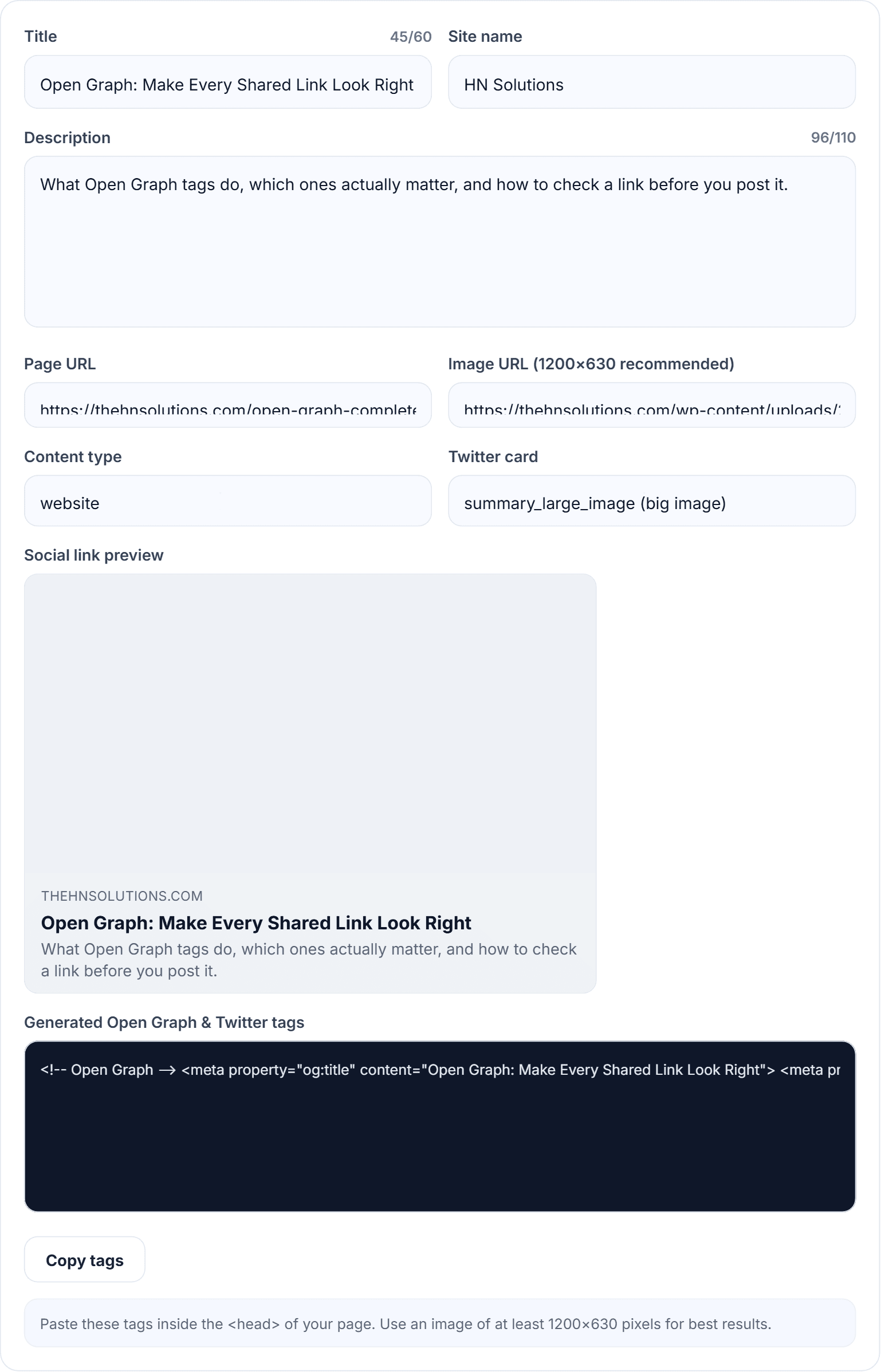
Our Open Graph generator shows a live social-card preview as you type — image, title, description, domain — exactly as the link will look when shared. Character counters keep you inside display limits, and the output includes the full OG set plus Twitter card tags, correctly escaped, with the 1200×630 dimension tags included. Free, browser-based, no account.
2. OpenGraph.xyz — solid checker/previewer
Good for inspecting an existing live URL’s tags across platform mock-ups. Complements a generator rather than replacing one.
3. Facebook Sharing Debugger — the cache fixer
Not a generator, but indispensable: it shows what Facebook scraped and has the “Scrape Again” button that fixes stale previews.
4. Rank Math / Yoast social tabs — per-post control in WordPress
Both output OG tags automatically and let you override per post. Use the generator for non-WordPress pages or to draft copy with a visual preview first.
5. Metatags.io — popular all-in-one previewer
Nice multi-platform mock-ups; generation features are more limited than the preview suggests.
What our Open Graph generator does differently
- You see the card before you ship it — the preview updates live, so there are no surprises in the group chat.
- Counters match platform truncation, not arbitrary limits.
- Complete output: OG + Twitter cards + image dimensions in one copy-paste block.
- Private and free: nothing you type leaves the browser; no sign-up, no watermark on your workflow.
How to set up Open Graph tags
- Open the Open Graph generator.
- Enter title (punchy, under 60 chars), description (~110 chars), your page URL and site name.
- Paste the absolute URL of your 1200×630 image and watch the preview assemble.
- Set og:type (article for posts, website for pages) and twitter:card to summary_large_image.
- Copy the tags into your page head — or mirror the copy into your SEO plugin’s Social tab on WordPress.
- Test with a real share to yourself on WhatsApp — the honest test — or run the URL through Facebook’s Sharing Debugger.
When the preview is wrong or stale
Platforms cache previews aggressively — sometimes for weeks. After changing tags: run Facebook’s Sharing Debugger and hit Scrape Again (fixes Facebook and WhatsApp), use LinkedIn’s Post Inspector for LinkedIn, and for X just re-validate by tweeting to yourself. If a change still does not appear, append ?v=2 to the shared URL to bypass cache while it expires.
Open Graph questions
Why does my link show no image at all?
Usually one of: relative image URL, image over the size limit, image blocked by robots.txt, or the platform cached the page before you added tags. Fix, then force a re-scrape.
Can OG title differ from my SEO title?
Yes, and often should — search snippets reward keyword clarity, social cards reward curiosity. Same promise, different voice.
Does Open Graph affect Google rankings?
Not directly. But shared links that get clicked build traffic and links, which very much do.
One image for all platforms — really?
1200×630 covers every large-card layout. Only add the 1:1 variant if square summary cards matter to you on X.
Getting your links to look right
Ten lines of metadata decide whether your shared links look professional or suspicious. Generate them in the free Open Graph generator, compress the card image with the image compressor, and keep the search-side snippet aligned in the meta tag generator — all part of our free SEO tools hub, alongside the daily tools.