
n8n vs Zapier vs Make — What Each One Really Costs
Zapier, Make and n8n charge for completely different things. We do the cost maths on one realistic workflow and show which fits your situation.

Most people pick an automation tool the same way: they Google “best automation platform,” land on Zapier because everyone has heard of it, build three workflows, and then get a bill six months later that makes them wonder what went wrong.
The problem is not that Zapier is bad. The problem is that these three platforms charge for completely different things, and the one that’s cheapest for your neighbor can be four times the price for you. A workflow that costs $20 a month on one platform can cost $300 on another — same work, same result.
This guide breaks down what each platform actually charges for, does the cost math on a realistic workflow, and gives you a straight answer on which one fits your situation.
Pricing verified August 2026. All three platforms change plans frequently — check the official pricing page before you commit to an annual plan.
The Short Answer
For the workflows themselves rather than the platform comparison, seven automations that save about ten hours a week covers what to build.
Before comparing platforms, it helps to know what you are actually building: AI automation for beginners covers the basics these three tools all share.
If you want the recommendation without the reasoning:
Choose Zapier if you need the widest app support and you’d rather pay more than troubleshoot anything. It’s the safe default for non-technical users running a small number of simple automations.
Choose Make if you want visual, multi-branch workflows at a low price and you’re willing to spend a weekend learning the interface. It’s the best value for most small businesses.
Choose n8n if you’re technical, you’re building AI agents, or your workflows have a lot of steps. It’s the cheapest at scale by a wide margin, and it’s the only one of the three you can self-host.
Now here’s why.
The Pricing Models Are Not Comparable — And That’s the Whole Story
This is the part almost every comparison article glosses over, and it matters more than any feature list.
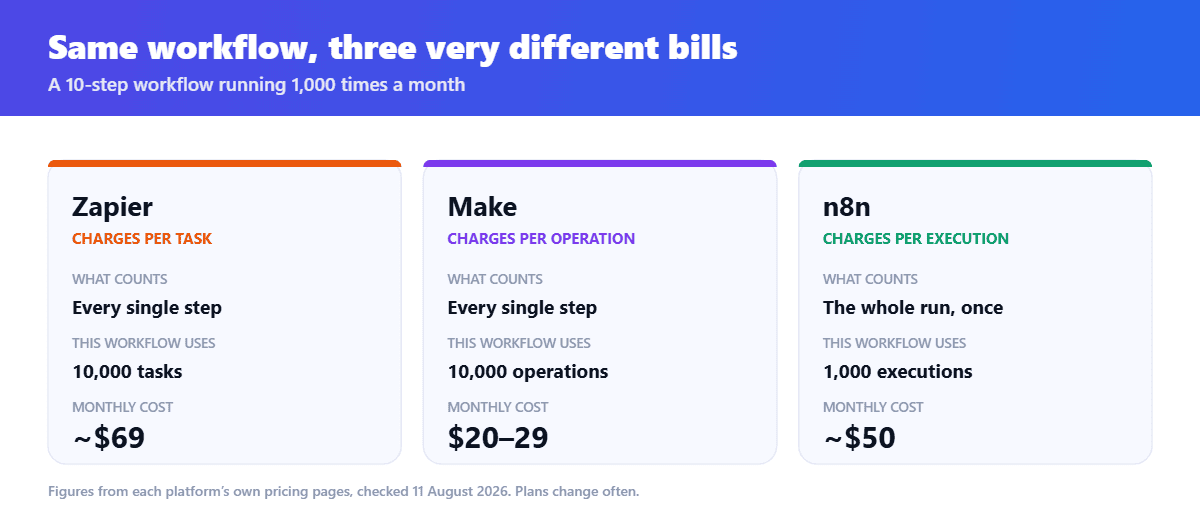
Zapier charges per task. A task is one action step that successfully runs. So a five-step Zap burns five tasks every single time it runs. Run it 100 times in a month, and you’ve used 500 tasks, not 100.
Make charges per operation, which works similarly — each module in your scenario consumes credit when it fires.
n8n charges per execution. Each time a complete workflow runs, it counts as one execution regardless of how many steps exist within that workflow or how much data it processes.
Read that again, because it’s the single most important sentence in this article. On n8n, a 3-step workflow and a 30-step workflow cost the same to run.
What This Looks Like in Real Money
Take a genuinely ordinary automation: a lead comes in through a form, gets enriched, added to your CRM, tagged, sent a welcome email, logged in a spreadsheet, and posted to a Slack channel. That’s roughly ten steps. Say it runs 1,000 times a month.
n8n Cloud Pro uses 1,000 executions at around $50/mo. Zapier uses 10,000 tasks at roughly $69/mo. Make uses 10,000 operations at $20–29/mo.
Now scale that up. Double the volume and the gap widens sharply, because n8n’s number only doubles once while the other two multiply step count by run count all over again.
One user’s experience captures the trap precisely. A February 2026 post described a real Zapier invoice of $847 for a month of automations running around 15,000 tasks, with an 8-step lead capture workflow meaning one new lead consumed 8 tasks — and noted the worst part was starting to remove steps from workflows just to keep the task count down.
That last point is the real cost. When your pricing model punishes complexity, you start designing worse automations to protect your budget.
Rule of thumb: Count the average number of steps in your workflows. If it’s under three, Make or Zapier’s model works fine. If it’s over six, n8n’s per-execution billing will save you serious money.
Zapier: The Safe, Expensive Default
Zapier’s advantage is genuinely real and often understated: it connects to more apps than anything else on the market, by a large margin. If you use a niche CRM, an obscure scheduling tool, or some vertical-specific SaaS product, Zapier is the platform most likely to already support it.
The interface is also the friendliest of the three. You pick a trigger, pick an action, map some fields, and you’re done. There’s no visual canvas to learn and no data structures to reason about.
Pricing (2026). The free plan gives you 100 tasks a month, a single seat, and Zaps capped at two steps. That’s enough to test the waters and nothing more. Professional starts at $29.99 per month for 750 tasks with unlimited multi-step Zaps, and Team starts at $103.50 per month for 2,000 tasks with shared workspaces.
Watch the billing basis carefully here. The advertised prices are annual billing — monthly billing adds roughly 50% to the Professional base price.
The catch nobody mentions. When you exceed your monthly task limit, Zapier charges 1.25x your base rate up to a hard cap of 3x your plan’s included tasks. And there’s a 2026 change worth knowing about: AI steps, code steps, MCP, and SDK calls now draw from the same task pool as regular actions, so agent-style and AI-heavy Zaps consume your allocation too.
That last detail matters a lot if AI automation is your actual goal. Every LLM call in your workflow is eating the same budget as your Slack notifications.
A small mercy: filters, paths, formatter steps, delays, tables and forms do not count as tasks. Front-load your filtering and you can meaningfully reduce your bill.
Best for: Non-technical users, small teams, anyone whose priority is “it works, and I don’t want to think about it,” and anyone depending on an unusual app integration.
Make: The Value Pick for Most Small Businesses
Make (formerly Integromat) sits in the middle, and for a lot of readers it’s the correct answer.
You build on a visual canvas where each app is a circular module, and you draw connections between them. Branching, error handling, iterators, and aggregators are all first-class citizens — things that are either awkward or impossible in Zapier’s linear model.
Pricing (2026). Make offers a free plan with 1,000 credits per month indefinitely, with paid plans starting at $9 for 10,000 credits per month, and you can buy additional credits or upgrade at any time. The free tier here is genuinely usable, unlike Zapier’s.
The trade-off is a steeper learning curve. Make’s canvas rewards you once it clicks, but the first few hours are confusing if you’ve only ever used simple trigger-action tools. Budget a weekend.
There are two other limits worth knowing. Make applies a hard data transfer limit tied proportionally to your operations plan — for example, 5GB per 10,000 operations. And it’s cloud-only: enterprise clients can install an on-premise agent for secure data access, but scenarios still run in the cloud. If data residency is a hard requirement — regulated industries, government contracts, strict security policies — Make is not a viable option.
Best for: Small businesses, marketers and operations teams who want real workflow logic without writing code, and anyone who found Zapier’s pricing painful but doesn’t want to manage a server.
n8n: The Power Option That Got Genuinely Accessible
n8n is open source, and that single fact changes everything about its economics.
Cloud pricing (2026). n8n Cloud is $24/mo for Starter with 2,500 executions or $60/mo for Pro with 10,000 executions, and every Cloud plan includes unlimited workflows and unlimited users.
Self-hosted. This is the headline. The self-hosted Community Edition is free software with unlimited executions — you pay only for the server, which runs around $3.70/mo on a managed host, $7/mo on a managed platform, or $5–6/mo on a raw VPS you administer yourself. Self-hosting saves most teams $200–700 per year compared to Cloud.
Unlimited automation for the price of a coffee is not an exaggeration. The catch is that you’re now responsible for uptime, backups, and updates. That’s a real job, not a footnote.
Where n8n has genuinely pulled ahead: AI. This is the part most 2024-era comparison articles get wrong. n8n’s native LangChain integration supports AI Agent nodes with tool-calling, multiple memory backends including vector stores and Redis, RAG pipelines, and multi-agent orchestration — you can build an agent that loops, makes decisions, and uses tools autonomously. By contrast, Make has AI app connectors for prompt-in, response-out steps but does not support agent loops or autonomous decision-making between steps.
If your goal is genuine AI automation rather than “an automation that calls ChatGPT once,” this is decisive.
The honest downside. n8n’s integration library is smaller. n8n covers around 600+ integrations against Zapier’s thousands, though it covers all the major SaaS platforms. The HTTP Request node lets you connect to virtually any API without building a custom node — which solves the problem, but only if you’re comfortable reading API documentation.
Best for: Developers, technical founders, AI builders, agencies running client automations at volume, and anyone with data sovereignty requirements.
Head to Head
| Zapier | Make | n8n | |
| Charges for | Each action step | Each operation | Each workflow run |
| Free plan | 100 tasks, 2-step limit | 1,000 credits/mo | Unlimited (self-hosted) |
| Entry paid price | ~$29.99/mo | ~$9/mo | $24/mo cloud, ~$5/mo self-hosted |
| Integrations | Most of any platform | Extensive | 600+ plus HTTP |
| Learning curve | Easiest | Moderate | Steepest |
| AI agents | Limited, consumes tasks | Prompt/response only | Full agent loops |
| Self-hosting | No | No | Yes |
| Best for | Non-technical users | Small business value | Technical & AI builds |
The short version. Count the steps in your busiest workflow, then multiply by how often it runs. If that number is large, you are paying per step on Zapier and Make and per run on n8n — and that single difference decides the bill.
How to Actually Decide
Skip the feature lists and answer three questions.
How many steps does your typical workflow have? Under three, and pricing model barely matters — pick on ease of use. Over six, and n8n’s per-execution billing will save you real money as you scale.
Are you building AI agents or AI steps? If you need an agent that loops and makes decisions, n8n is the only one of the three that does it properly. If you just need to call an LLM once inside a workflow, all three work.
Who maintains this? If the answer is “me, and I’m not technical,” self-hosted n8n is a trap regardless of how cheap it looks. Pay for Make or n8n Cloud instead.
One more piece of advice: start on a free tier and build your three most important workflows before paying anyone. You’ll learn more about which platform fits you in two hours of building than in twenty of reading comparisons — including this one.
Pricing questions people keep asking
Is n8n really free? The self-hosted Community Edition is free software with unlimited executions. You still pay for a server, typically $4–7 a month. n8n Cloud, the managed version, starts at $24 a month.
Which is cheapest overall? For simple, low-volume workflows, Make. For complex or high-volume workflows, self-hosted n8n by a wide margin. Zapier is rarely the cheapest — you pay for breadth of integrations and ease of use.
Can I migrate between them? Not automatically. Workflows have to be rebuilt by hand on the new platform. This is why it’s worth testing properly before committing to an annual plan.
Is Make the same as Integromat? Yes. Integromat rebranded to Make, and the underlying platform is the same product with continued development.
Which is best for AI automation specifically? n8n, clearly, if you want autonomous agents with tool-calling and memory. All three can call an AI model inside a workflow, but only n8n supports genuine agent loops.
Do filters count against my Zapier limit? No. Filters, paths, formatter steps, and delays don’t consume tasks. Putting filters early in a Zap is one of the easiest ways to reduce your bill.
More on AI automation
Related reading on HN Solutions.
Going deeper on Make? Read the full Make.com review.