
Robots.txt: Block AI Bots, Avoid the Killer Slash
How robots.txt works line by line, the typo that deindexes sites, whether to block GPTBot and friends, and the correct setup for WordPress in five minutes.

There is a plain text file at the root of your website that every search engine reads before it looks at anything else. Written correctly, it keeps crawlers focused on the pages that matter. Written wrongly — sometimes by a single character — it can wipe your entire site from Google. In 2023, a misplaced Disallow: / pushed a well-known brand’s whole domain out of search for days; it happens to someone every week.
And robots.txt has taken on a second life: it is now the standard place to tell AI companies whether they may harvest your content for model training. This guide explains how the file works line by line, the classic mistakes, the AI-bot question, the best generators, and the correct setup for WordPress and most sites.
Robots.txt Generator
Build a valid robots.txt with the crawl rules you want.
What robots.txt actually does
Robots.txt implements the Robots Exclusion Protocol — a set of polite instructions to crawlers, served at yoursite.com/robots.txt. Its directives:
- User-agent: which bot the following rules address (
*= everyone,Googlebot,GPTBot…). - Disallow: paths that bot should not crawl.
Disallow: /admin/blocks a folder;Disallow: /blocks everything;Disallow:(empty) blocks nothing. - Allow: carve-outs inside blocked areas — the classic WordPress example allows
admin-ajax.phpinside blocked/wp-admin/. - Sitemap: the full URL of your XML sitemap, so every crawler finds your page list immediately.
- Crawl-delay: seconds between requests — respected by some bots (not Google), occasionally useful on struggling servers.
The critical nuance: robots.txt controls crawling, not indexing. A blocked page can still appear in results (as a bare URL) if other sites link to it. To keep a page out of Google, use a noindex meta tag — set it in seconds with our meta tag generator — and do not block the page in robots.txt, or Google can never see the noindex. Getting this backwards is the most common advanced mistake in SEO.

The mistakes that cost real traffic
- The killer slash:
Disallow: /underUser-agent: *— often a staging-site setting that ships to production. Check yours today. - Blocking CSS and JS: Google renders pages; block your theme assets and it sees broken layouts, and rankings follow.
- Blocking instead of noindexing (see above) — the page stays in results, ugly and uncontrolled.
- Case and path errors: rules are case-sensitive;
/Admin/does not block/admin/. - No sitemap line: free discovery, skipped.
- Cargo-cult copying: pasting another site’s file, inheriting rules that make no sense for yours.
The AI bot question
AI companies crawl the web for training data, and most now respect robots.txt opt-outs. The main user-agents: GPTBot and ChatGPT-User (OpenAI), ClaudeBot and anthropic-ai (Anthropic), Google-Extended (Gemini training — separate from Googlebot, so blocking it does not affect search), CCBot (Common Crawl, feeding many models), PerplexityBot, Bytespider (ByteDance), Amazonbot, Applebot-Extended and meta-externalagent.
Should you block them? Trade-offs, honestly: blocking asserts control over your content and keeps it out of training sets; allowing may earn citations in AI answers, which is becoming a real traffic source. Publishers increasingly block training bots (GPTBot, Google-Extended, CCBot) while leaving search-adjacent bots alone. Whatever you choose, our generator’s “Block AI bots” preset writes the current list correctly in one click.
The best robots.txt tools compared
1. HN Solutions Robots.txt Generator — best free, mistake-proof generator
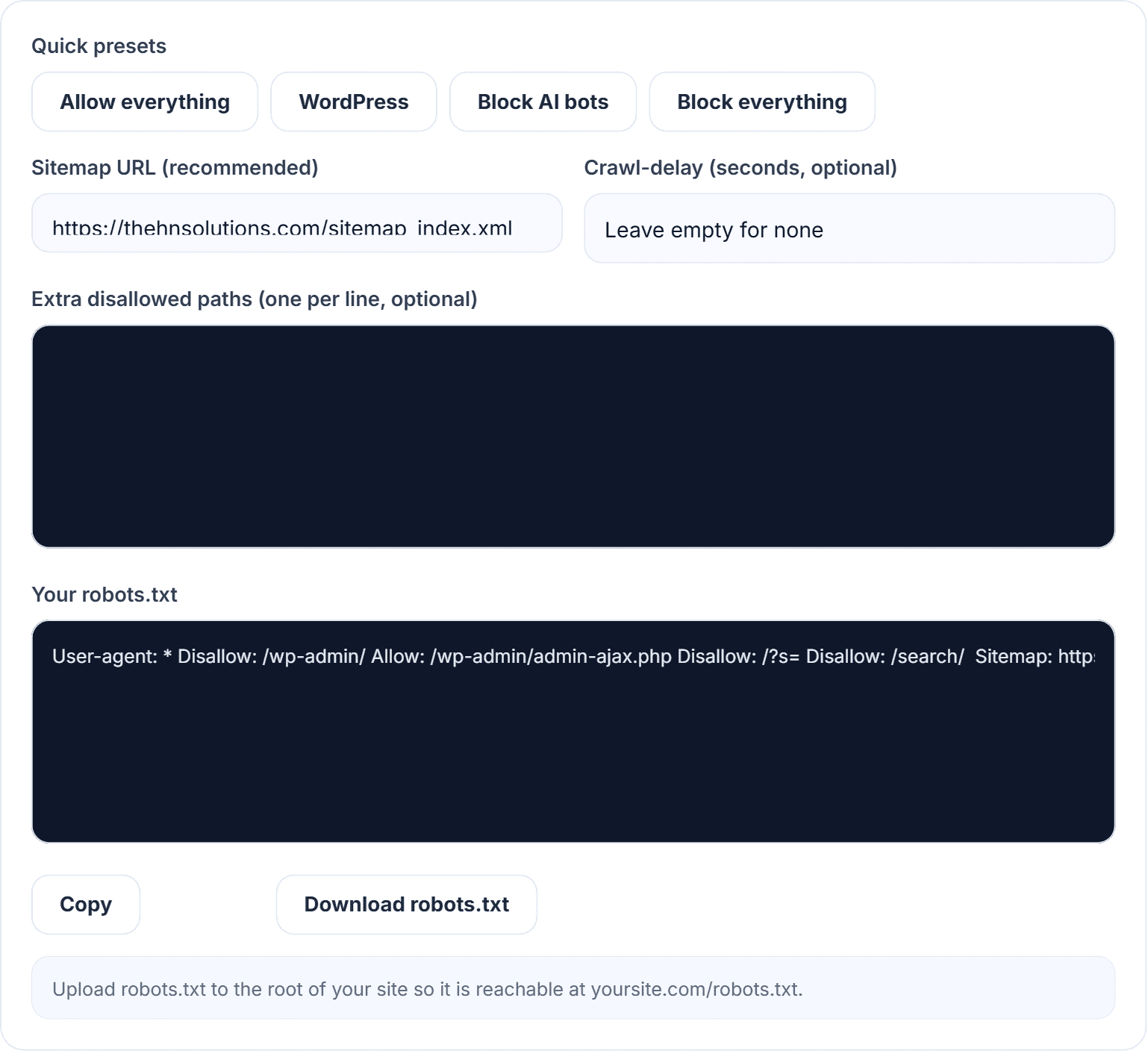
Our robots.txt generator builds a syntactically correct file from one-click presets — allow everything, a WordPress-optimised setup, block all crawlers, or block AI training bots with an up-to-date agent list. Add custom disallowed paths, crawl-delay and your sitemap URL, then copy or download the finished robots.txt. Free, instant, browser-based.
2. Google Search Console robots.txt report — best validator
Not a generator, but the authoritative check: it shows the file Google actually fetched and any parse errors. Use it after every change.
3. Rank Math / Yoast editors — convenient in WordPress
Both let you edit robots.txt from the dashboard — a sensible place to paste what you generated.
4. TechnicalSEO.com tester — good rule debugger
Test whether a specific URL is blocked for a specific bot. Handy for complex rule sets.
5. Hand-editing — fine, with a validator
It is a text file; you can write it in Notepad. The generator exists because one character of syntax drift has outsized consequences.
What our robots.txt generator gets right
- Presets encode best practice: the WordPress preset ships the admin-ajax carve-out most hand-written files forget.
- The AI list is maintained: eleven current training bots, spelled exactly right.
- Syntax is guaranteed: no invisible characters, no malformed directives, sitemap line placed correctly.
- Copy or download a ready-to-upload file in seconds, free, no account.

How to set up robots.txt correctly
- Open the robots.txt generator.
- Pick your preset — WordPress for most blogs, Allow everything for simple sites, Block AI bots if that is your policy.
- Add extra paths to block: cart and checkout pages, internal search results, staging folders.
- Paste your sitemap URL (make one with the XML sitemap generator if needed).
- Download and upload to your site root — or paste into Rank Math → General Settings → Edit robots.txt on WordPress.
- Verify at
yoursite.com/robots.txt, then check Search Console’s robots report for errors.
Pro tips: never block /wp-content/ wholesale — your images and CSS live there; keep the file lean — every rule is a chance to be wrong; and audit it whenever you migrate hosts or launch a redesign, which is exactly when killer slashes sneak in.
Robots.txt questions we get asked
Do all bots obey robots.txt?
Reputable ones do — Google, Bing, the major AI crawlers. Scrapers and bad actors ignore it; it is a protocol, not a firewall.
Does blocking Google-Extended hurt my rankings?
No. It only opts you out of Gemini training data. Googlebot — the search crawler — is unaffected.
Where exactly does the file go?
The domain root: https://yoursite.com/robots.txt. Subdomains need their own file.
Do I even need one?
Without it, everything crawlable gets crawled — fine for tiny sites. You still want one for the sitemap line and the AI policy alone.
Before you save that file
Robots.txt is twenty lines that steer everything crawlers do on your site — worth five careful minutes. Generate yours with the free robots.txt generator, pair it with a proper XML sitemap, and control the index page-by-page with the meta tag generator — all free in our SEO tools hub.
Free tools for this
Built here, run in your browser, no sign-up.