
Meta Tags That Win the Click
Which meta tags matter in 2026, exact length rules for titles and descriptions, why Google rewrites yours, and the free generator with live SERP preview.

Before anyone reads your article, they read two lines: your title tag and your meta description, sitting in a Google results page next to nine competitors. Those two lines decide whether your months of content work earns a click or gets scrolled past. They are, character for character, the highest-leverage copy you will ever write.
Yet most sites autogenerate them, truncate them, or duplicate them across pages. This guide covers what each meta tag actually does in 2026, the exact length and writing rules, the mistakes that quietly bleed traffic, the best generator tools, and how to write snippets that lift click-through rate — which itself feeds back into rankings.
Meta Tag Generator
Title, description and viewport tags without the guesswork.
The meta tags that matter (and the ones that do not)
- Title tag — the blue headline in results, the browser tab label, the default social share title. A confirmed ranking factor and the #1 click driver.
- Meta description — the grey text under the title. Not a direct ranking factor, but it is your sales pitch; better descriptions measurably raise CTR, and CTR patterns influence how Google treats you.
- Robots meta — index/noindex, follow/nofollow. Small tag, nuclear consequences: one stray noindex removes a page from Google entirely.
- Canonical link — tells Google which URL is the “real” one when content is reachable at several addresses. Your defence against duplicate-content dilution.
- Viewport and charset — one line each for mobile rendering and text encoding. Boring, mandatory.
- Meta keywords — dead since 2009. Any guide recommending it is telling you how old it is.
Writing title tags that win the click
- Stay under ~60 characters (Google truncates by pixel width; 60 characters is the safe proxy). Truncated titles lose their endings — and often their meaning.
- Front-load the keyword: searchers scan for their query; finding it early confirms relevance. “Keyword Research Guide: Free Workflow” beats “A Complete and Comprehensive Free Workflow Guide to Keyword Research”.
- Add a hook: a number, a year, a benefit, a differentiator — “(Free)”, “in 10 Minutes”, “Without Plugins”. This is ad copy, not a filing label.
- One title per page, unique across the site. Duplicate titles make Google pick for you — badly.
- Brand at the end, after a pipe or dash, if space allows.
Writing meta descriptions that convert impressions
- 120–160 characters. Under 120 wastes the slot; over 160 gets the mid-sentence “…” of shame.
- Answer “what is in it for me” in the first clause, then add specificity: what is covered, what the reader walks away with.
- Include the keyword once — Google bolds matched terms, which draws the eye.
- Active voice, second person: “Learn how to…” outperforms “This page contains information about…”.
- Know that Google rewrites descriptions for many queries. A strong hand-written description is used more often, and it is what social shares and AI summaries fall back on regardless.
The best meta tag tools compared
1. HN Solutions Meta Tag Generator — best free generator with live preview
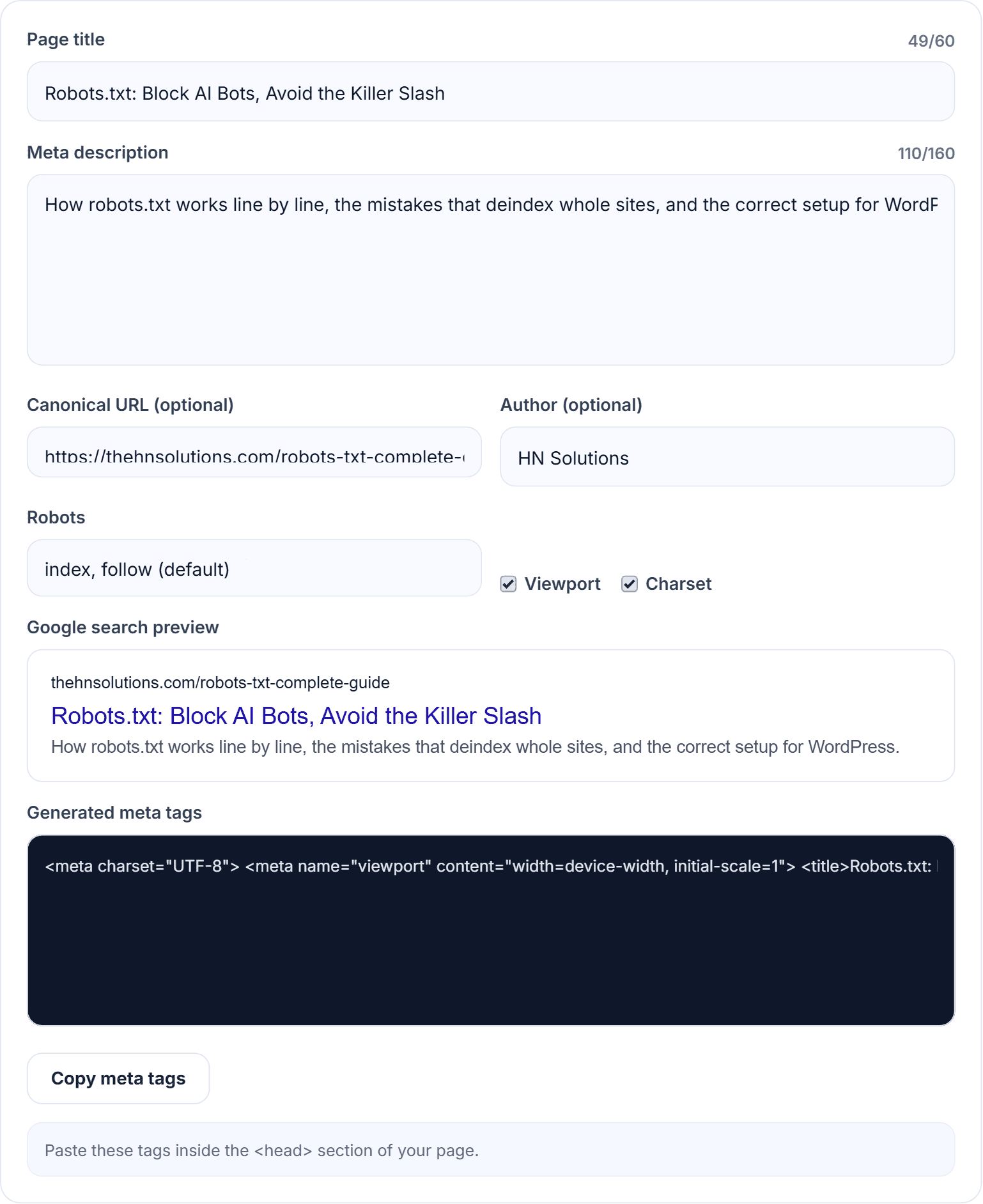
Our meta tag generator shows a live Google-style preview as you type, with character counters that turn red the moment your title passes 60 or your description passes 160. It outputs the complete, correctly escaped tag set — title, description, robots, author, canonical, viewport, charset — ready to paste into any site’s head. Free, no account, and nothing you type leaves your browser.
2. Rank Math / Yoast — best inside WordPress
If you run WordPress (as we do), your SEO plugin writes these tags per post — use it. The generator still earns its keep for non-WordPress pages, landing pages, client work and quick drafting outside the editor.
3. SERP simulators (Mangools, SISTRIX) — preview-only
Nice pixel-accurate previews; most stop there without generating the full tag set.
4. Screaming Frog — best for auditing at scale
Crawls your whole site and lists every title and description with lengths and duplicates. The desktop tool for finding problems; not for writing.
5. AI writers — fast drafts, loose lengths
Useful for first-pass ideas, but they routinely blow past character limits — draft with AI if you like, then verify in a counter and preview before shipping.
Why use our meta tag generator
- The preview is the point: you see the snippet as a searcher will, not as a form field.
- Limits enforced visually — red counters end truncation accidents forever.
- Complete output: robots, canonical and the boring-but-required tags included, correctly escaped.
- Private and instant: browser-only, no sign-up, works for any site — WordPress, Shopify, hand-coded, anything.
How to use the meta tag generator
- Open the meta tag generator.
- Write your title watching the preview — front-load the keyword, stop before the counter goes red.
- Write the description: benefit first, keyword once, 120–160 characters.
- Set canonical to the page’s clean URL; leave robots on “index, follow” unless you specifically need otherwise.
- Copy the tags into your page head — or transcribe title and description into your CMS’s SEO fields.
Pro tips: find pages worth rewriting in Search Console — high impressions, low CTR is free traffic waiting on a better snippet; refresh year-stamped titles each January; and test one page’s title change at a time so you can attribute the CTR lift.
Meta tag questions
Why does Google show a different title than mine?
Google rewrites titles it considers too long, keyword-stuffed or mismatched to the query. Concise, accurate titles under 60 characters get kept most often.
Do meta descriptions affect rankings?
Not directly — but they change click-through rate, and a listing that consistently out-earns its position sends a strong quality signal.
Same title and H1 — is that okay?
Fine, and common. Some sites use a punchier title tag and a fuller H1; both approaches work as long as each is unique per page.
How often should I update meta tags?
When CTR underperforms position, when content changes materially, and when the year in your title goes stale.
Writing tags people actually click
Two lines of text stand between your content and its clicks — write them deliberately. Draft every snippet in the free meta tag generator, pick the keyword with the research tool, and if the page gets shared socially, give it matching Open Graph tags too. The whole kit is in our free SEO tools hub.
Free tools for this
Built here, run in your browser, no sign-up.