
Base64 Explained, and Why It Is Not Security
How Base64 works, data URIs and JWTs, why decoding fails, the URL-safe variant, and the one misconception that causes real security incidents.

Open any email’s source, peek at an API response, inspect a webpage’s CSS, or debug a JWT token, and you will meet the same alphabet soup: SGVsbG8gd29ybGQ=. That is Base64 — the encoding that lets binary data travel through systems built for text — and if you work anywhere near computers, sooner or later you need to encode or decode it.
This guide explains what Base64 actually does (and the one thing everyone wrongly believes it does), where you meet it in real life, why decoding sometimes fails with cryptic errors, the URL-safe variant that silently breaks naive decoders, and the encoder-decoder that handles all of it — emoji, Urdu and broken padding included.
What Base64 actually is
Computers store everything as bytes — 256 possible values each. But huge parts of computing infrastructure were built to handle text: email protocols, JSON, XML, URLs, HTML. Push raw bytes through them and things corrupt, truncate or explode.
Base64 solves it with a simple trade: take any bytes, chop them into 6-bit chunks, and map each chunk to one of 64 safe characters — A–Z, a–z, 0–9, + and /. Any binary data becomes a text string that survives every text pipeline, at the cost of ~33% size growth (3 bytes become 4 characters). The = signs at the end are padding to round the length to multiples of four.
That is all it is: a costume, not a safe.
The dangerous misconception: encoding ≠ encryption
Base64 output looks scrambled, so people treat it as security. It is not — it is a publicly documented, instantly reversible transformation. Decoding requires no key, no password, no effort: paste into any decoder, done.
Real incidents happen constantly: passwords “hidden” in Base64 inside config files, API keys “obscured” in client-side code, personal data “protected” in URLs. All exactly as secure as writing it on a postcard in French and hoping the postman does not speak French. For actual secrecy you need encryption (AES and friends); for passwords, hashing. Base64 is transport, never protection — and knowing this puts you ahead of a surprising fraction of working developers.
Where you actually meet Base64

- Data URIs: images embedded directly in HTML or CSS as
data:image/png;base64,...— no separate file request. Perfect for tiny icons and email signatures where external images get blocked. Our tool’s file mode generates these ready-to-paste. - JWT tokens: the auth tokens in modern web apps are three Base64 blocks joined by dots. Decoding the middle block shows the claims your app is running on — invaluable for debugging login issues.
- Email attachments: every attachment you have ever sent travelled as Base64 — MIME encodes them behind the scenes.
- APIs and webhooks: binary payloads (PDFs, images, certificates) inside JSON arrive Base64-wrapped, because JSON cannot carry raw bytes.
- Basic auth headers:
Authorization: Basic dXNlcjpwYXNz— username:password in Base64 (which is why Basic auth without HTTPS is a security joke). - Config files and certificates: SSH keys, TLS certificates (PEM format) — those blocks between BEGIN/END lines are Base64.
Why decoding fails (and the fixes)
- Missing padding: strings stripped of trailing
=fail in strict decoders. Fix: re-add padding until length divides by 4 — our decoder does this automatically. - URL-safe variant: in URLs and tokens, + and / cause chaos, so a variant replaces them with – and _. Standard decoders choke on it. Ours accepts both automatically, and can encode URL-safe with one toggle.
- Line breaks and whitespace: email-wrapped Base64 arrives with newlines every 76 characters; some decoders object. Trim and retry.
- The UTF-8 problem: JavaScript’s raw
btoa()throws on emoji, Urdu, Hindi, Chinese — anything beyond Latin-1. Tools built on naive btoa simply break on real-world text. Ours encodes UTF-8 properly, so🚀and every script on earth round-trip perfectly.
The best Base64 tools compared
1. HN Solutions Base64 Encoder/Decoder — best all-rounder
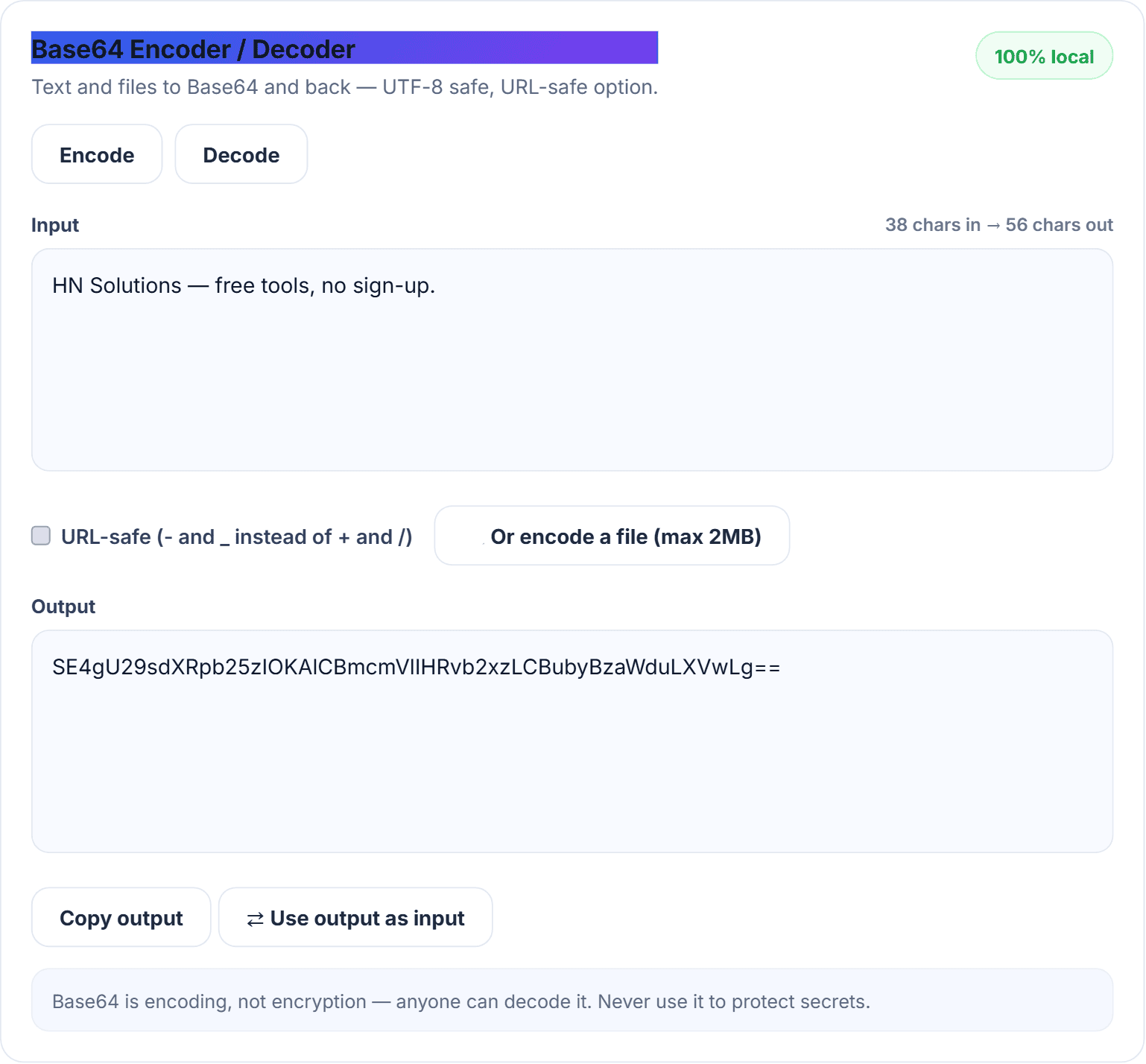
Our encoder/decoder is UTF-8 safe, auto-repairs padding, accepts and produces the URL-safe variant, converts files to data URIs (up to 2MB), shows live length stats, and has a one-click swap that feeds output back as input for chained operations. Everything local — pasted secrets never leave your browser, which matters given what people paste into these tools.
2. base64decode.org — popular, ad-supported
Does the basics competently; processing happens server-side, which is worth remembering before pasting anything sensitive.
3. Browser console (btoa/atob) — free, sharp edges
Fine for ASCII quickies if you are comfortable in DevTools; breaks on Unicode and unpadded input in exactly the ways described above.
4. CyberChef — the full kitchen
GCHQ’s “cyber Swiss army knife” chains dozens of operations — magnificent for forensics, a labyrinth for one decode.
How to use the encoder/decoder
- Open the Base64 tool and pick Encode or Decode — output updates live as you type or paste.
- Toggle URL-safe when the string travels in URLs, filenames or tokens.
- For images and files, click the file button — you get a complete data URI ready for CSS or HTML.
- Use ⇄ swap to verify a round-trip or chain operations.
Pro tips: decoding a JWT? Split on the dots and decode each of the first two parts separately; embedding images as data URIs, keep them under ~10KB (compress first with the image compressor) — beyond that, separate files cache better; and if decoded output looks like gibberish, it is probably binary data (an image, a zip) rather than text — that is correct behaviour, not a bug.
Base64 questions that keep coming up
Why does Base64 make files bigger?
Three bytes become four characters by design — the ~33% overhead is the price of surviving text-only pipelines.
Is Base64 the same as hashing?
No. Base64 is reversible by anyone; hashing (SHA-256, bcrypt) is deliberately one-way. Confusing them is how passwords end up “encrypted” in Base64 — a genuine security incident.
What are the = signs at the end?
Padding to make the length divisible by four. One or two are normal; their absence is the most common cause of decode failures.
Can Base64 handle emoji and non-English text?
With proper UTF-8 handling, perfectly — our tool round-trips every script and emoji. Naive implementations throw errors; that is the tool’s fault, not Base64’s.
What to remember about Base64
Base64 is the plumbing of the text-based internet: everywhere, invisible, and occasionally in need of a wrench. Keep the free encoder/decoder in your bookmarks next to its developer-adjacent neighbours — the case converter for variable names, the word counter for payloads, and the QR generator for getting URLs onto phones — all in our free daily tools.
Free tools for this
Built here, run in your browser, no sign-up.