
QR Codes That Never Expire and Always Scan
Static vs dynamic codes, the expiry trap in "free" generators, design rules that double scan rates, and how to make a print-ready QR code in ten seconds.

QR codes died, apparently, sometime around 2015 — and then a pandemic put one on every restaurant table on earth and they never left. Today they are on menus, business cards, product packaging, event tickets, shop counters and billboards. They work because they remove friction: no typing, no searching, just point a camera and go.
But there is a right and a wrong way to make one. A QR code that is too small, low-contrast, or hosted on a link-shortening service that expires is worse than no code at all. This guide covers how QR codes work, static versus dynamic codes (this one matters more than you would think), the best generators, and how to make a print-ready code in ten seconds.
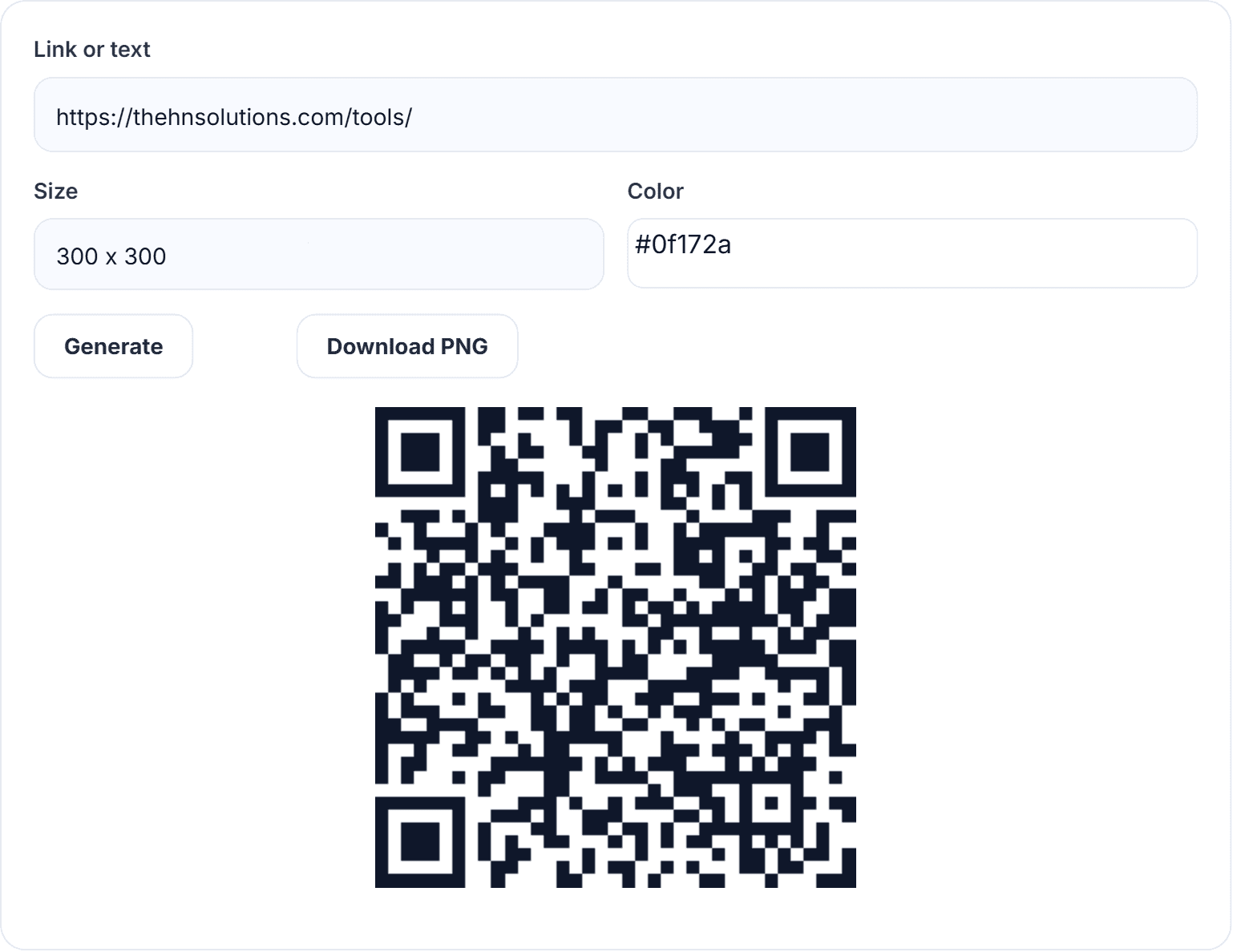
QR Code Generator
Turn any link or text into a downloadable QR code.
How a QR code actually works
A QR (Quick Response) code is just text — usually a URL — encoded into a grid of black and white modules. The three big squares in the corners tell the scanner where the code’s edges are and which way is up; the rest of the grid stores your data plus error-correction bytes.
That error correction is the clever part. QR codes use Reed–Solomon coding at four levels (L, M, Q, H), letting a scanner reconstruct the data even when up to 30% of the code is damaged, dirty or covered. It is why a scratched code on a parcel still scans, and why codes with logos punched in the middle can still work — the logo simply “damages” an area the error correction can absorb.
Static vs dynamic QR codes — read this before you print
This is the single most important thing to understand before putting a QR code on anything permanent.
- Static codes encode your link directly into the image. They work forever, need no account, and nobody sits between your customer and your website. The trade-off: the destination cannot be changed after printing.
- Dynamic codes encode a redirect URL owned by the QR service. You can change the destination later and see scan counts — but the code depends on that company. If your subscription lapses or the service shuts down, every printed code goes dead. Many “free” QR services quietly generate dynamic codes that expire after 14 days, then charge to keep them alive. That is the business model.
Rule of thumb: for menus, cards, packaging and anything printed, use a static code from a generator that encodes your link directly — like ours. Consider dynamic only if you genuinely need to swap destinations or track scans, and you accept the dependency.
Where QR codes earn their keep
- Restaurants and cafés: menu on the table, reviews link on the receipt.
- Business cards: one scan adds your website or portfolio — no typing your URL at a networking event.
- Product packaging: manuals, warranty registration, how-to videos.
- Events: tickets, schedules, feedback forms, WiFi access.
- Retail counters: payment links, loyalty sign-ups, Instagram follows.
- Posters and flyers: the only practical bridge from print to web.
- Creators: link-in-bio pages on thumbnails, slides and merch.
The best QR code generators compared
1. HN Solutions QR Code Generator — best free static codes
Our QR code generator makes true static codes: your link is encoded directly into the image, so it never expires and never redirects through anyone’s server. Pick a size up to print resolution, set a custom colour, and download a clean PNG — free, unlimited, no account, and generated in your browser so your links stay private.
2. QR Code Monkey — good customisation, upload-based
Solid free static codes with logo embedding and colour gradients. Feature-rich, though the interface is busy and generation happens server-side.
3. QRickit / GoQR — bare-bones utilities
Simple API-style generators. Fine for quick jobs, minimal design control.
4. Bitly / Flowcode — dynamic, subscription-first
Polished analytics and editable destinations, but codes route through their servers and free tiers are limited or expiring. Use only if tracking is worth the dependency.
5. Canva — pretty, inside a design workflow
Convenient when you are already designing a flyer there; less convenient as a standalone tool, and you will want to double-check quiet zones.
What our QR generator does that others do not
- Static forever: the code is your link, full stop. Print it on a thousand menus without a subscription anxiety attack.
- Private: generated locally in your browser — your URLs are not logged by a third-party service.
- Print-ready: high error correction and sizes large enough for posters, with custom colours that keep scannable contrast.
- Actually free: no watermark, no trial, no 14-day expiry trap.
How to create a QR code (and get it scanned)
- Open the QR code generator.
- Paste your link — or any text, WiFi details, contact info.
- Pick a size: 300px is fine for screens; use 1000px+ for print.
- Choose a colour. Keep it dark on a light background — scanners read dark modules, so never invert.
- Download the PNG and place it in your design.
Design rules that decide whether people scan
- Size: minimum 2×2cm in print; bigger if scanned from a distance (rule of thumb: distance ÷ 10).
- Quiet zone: leave a clear margin around the code — cramming graphics against it breaks scanning.
- Contrast: dark code, light background, no busy imagery behind it.
- Call to action: “Scan for menu” doubles scan rates versus a naked square.
- Test before printing: scan it with both an iPhone and an Android from arm’s length. Every time. No exceptions.
QR code questions
Do QR codes expire?
Static codes never expire — they contain the link itself. Dynamic codes expire whenever the service behind them decides. Ours are static.
Can I put a QR code on dark backgrounds?
Put the code in a white box first. Scanners expect dark modules on a light field; a white code on black fails on many devices.
How much data fits in a QR code?
Up to ~4,000 characters technically, but more data means denser, harder-to-scan codes. Keep URLs short — a clean link scans faster from further away.
Can QR codes be dangerous?
A code is only as trustworthy as its link. For your own codes, generating them yourself (rather than through a redirect service) means there is no middleman to hijack.
Making codes that keep working
A good QR code is boring: static, high-contrast, properly sized, tested. Make one in ten seconds with our free QR code generator, shrink the flyer images around it with the image compressor, and if the code points to your website, make sure that page is worth the scan — our meta tag generator and other free SEO tools will help it rank too.