
How Strong Is Your Password, Really?
How passwords get cracked, what entropy really means, the best generators compared, and the 5-minute routine that makes your accounts effectively unhackable.

Here is an uncomfortable fact: if your password is a word, a name, or a date — even with a clever “@” swapped in — modern cracking rigs can guess it in minutes. Billions of real passwords have leaked over the years, and attackers feed those lists into software that tries millions of guesses per second. “Sana@1998” does not stand a chance.
The fix costs nothing and takes five seconds: stop inventing passwords and start generating them. This guide explains how passwords actually get cracked, what makes one genuinely strong, which generators to trust, and how to build a routine where you never memorise a password again.
Password Generator
Strong random passwords with the rules you choose.
How passwords actually get cracked
Dictionary and rule attacks
Attackers do not guess randomly. They start with dictionaries of real leaked passwords, then apply rules: capitalise the first letter, append a year, swap a for @. Every “trick” you have ever used is already in the rulebook. That is why human-invented passwords fail — we all follow the same patterns.
Brute force
For short passwords, attackers simply try every combination. An 8-character lowercase password has about 209 billion combinations — a modern GPU cluster chews through that in hours. Each extra character multiplies the work, which is why length is the single biggest factor in strength.
Credential stuffing
The laziest attack of all: take email + password pairs from one breached site and try them everywhere else. If you reuse passwords, one leak anywhere unlocks your accounts everywhere. This is the most common way real people get hacked — not genius hackers, just recycled logins.
What actually makes a password strong
Security people measure password strength in bits of entropy — roughly, how many guesses an attacker needs. The maths is simple: entropy grows with the size of the character set and, much faster, with length.
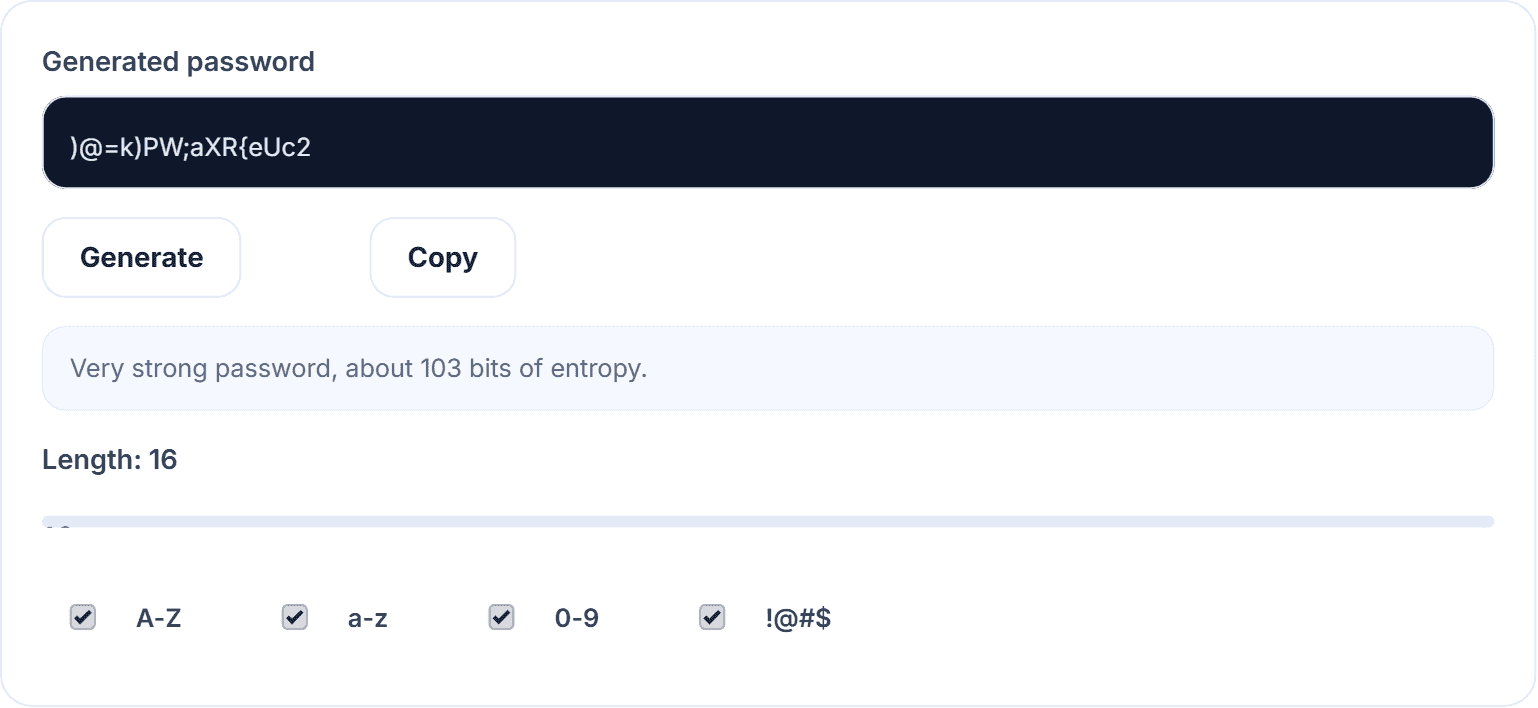
- 8 characters, lowercase only: ~38 bits — crackable in hours.
- 12 characters, mixed case + numbers: ~71 bits — years of effort.
- 16 characters, full character set: ~103 bits — effectively uncrackable with current hardware.
Three rules follow. One: 16 characters or more. Two: generated randomly, not invented — randomness is the whole point, and humans are terrible at it. Three: unique per account, so a leak in one place stays in one place.
Where people go wrong (even careful people)
- Personal patterns: pet names, birthdays, cricket teams — all in the dictionaries.
- Keyboard walks: qwerty123, 1qaz2wsx — in the dictionaries.
- One “strong” password reused everywhere: strength is irrelevant once it leaks.
- Storing passwords in a notes app or spreadsheet: one stolen phone away from disaster.
- Changing passwords by incrementing a number: attackers literally test that rule first.
The best password generators compared
1. HN Solutions Password Generator — best free browser-based option
Our free password generator uses the Web Crypto API — the same cryptographically secure randomness your browser uses for encryption — not a predictable formula. You choose length (6–64) and character sets, it shows a live strength and entropy estimate, and everything happens on your device: nothing is generated on, sent to, or stored by any server. No sign-up, no limits.
2. Bitwarden’s generator — best if you use Bitwarden
Excellent and open-source, including passphrase mode. It lives inside the password manager, which is ideal if you are already a user, slightly heavier if you just need a quick password.
3. 1Password’s generator — polished, paid ecosystem
Great UX and “smart” passwords tuned to each site’s rules, but tied to a subscription.
4. LastPass generator — fine, with baggage
Functional, though the company’s repeated security incidents have dented trust in the wider product.
5. Diceware passphrases — best offline method
Roll physical dice, pick words from a list: “correct horse battery staple” style. Extremely strong and memorable, just slower to produce.
How our password generator actually works
- Real cryptographic randomness (crypto.getRandomValues), not Math.random() — the difference between unguessable and merely unlikely.
- 100% local: the password exists only on your screen until you copy it. Close the tab and it is gone forever.
- Honest feedback: the live entropy readout tells you exactly how strong your settings are instead of a vague colour bar.
- Zero friction: no account, no app install, works on any device, free without limits.
How to use the password generator (the full routine)
- Open the password generator.
- Set the length slider to 16+ (go 20+ for email and banking — your email account is the master key to everything else).
- Keep all four character sets ticked unless a site forbids symbols.
- Click Generate, then Copy.
- Paste it into the site and into a password manager (Bitwarden is free and excellent). Never into a notes app.
- Repeat per account. The generator is unlimited — every login deserves its own password.
Also do these two things today: turn on two-factor authentication for email and banking (a strong password plus 2FA stops essentially all remote account takeovers), and check your email at haveibeenpwned.com to see which old passwords are already burned.
Password questions worth asking
Are online password generators safe?
Browser-based ones that generate locally — like ours — are safe: the password never travels over the network. Be wary of any generator that requires an account or “saves” your password for you.
Is a long passphrase better than a random string?
Both work. Four to five random words (~64+ bits) are easier to type; a 16+ character random string is stronger per character. For accounts stored in a manager, random strings win since you never type them anyway.
How often should I change passwords?
Only when there is a reason — a breach, a shared account, a suspicious login. Forced regular rotation just pushes people toward weaker patterns.
What is the strongest password length?
Anything past ~20 random characters is beyond any realistic attack. Our slider goes to 64 if you enjoy overkill.
What actually makes a password strong
You do not need to be a security expert — you need a generator, a manager, and 2FA. Start with the free password generator, and while you are securing your digital life, our QR code generator and other free daily tools are one click away. For website owners, pair this with our free SEO tools to keep both your accounts and your rankings healthy.