
How to Write Better Prompts for Claude AI


Most people use Claude AI at about 20% of its actual capability — not because Claude is limited, but because their prompts are. The difference between a frustrating AI experience and a genuinely impressive one often comes down to how you ask. This guide teaches you exactly how to write prompts that unlock Claude’s full potential — with real before-and-after examples throughout.
Why Your Prompts Matter More Than You Think
Claude AI is extraordinarily capable — but it’s not a mind reader. It responds to exactly what you give it. A vague prompt produces a vague response. A precise, well-structured prompt produces precise, impressive output.
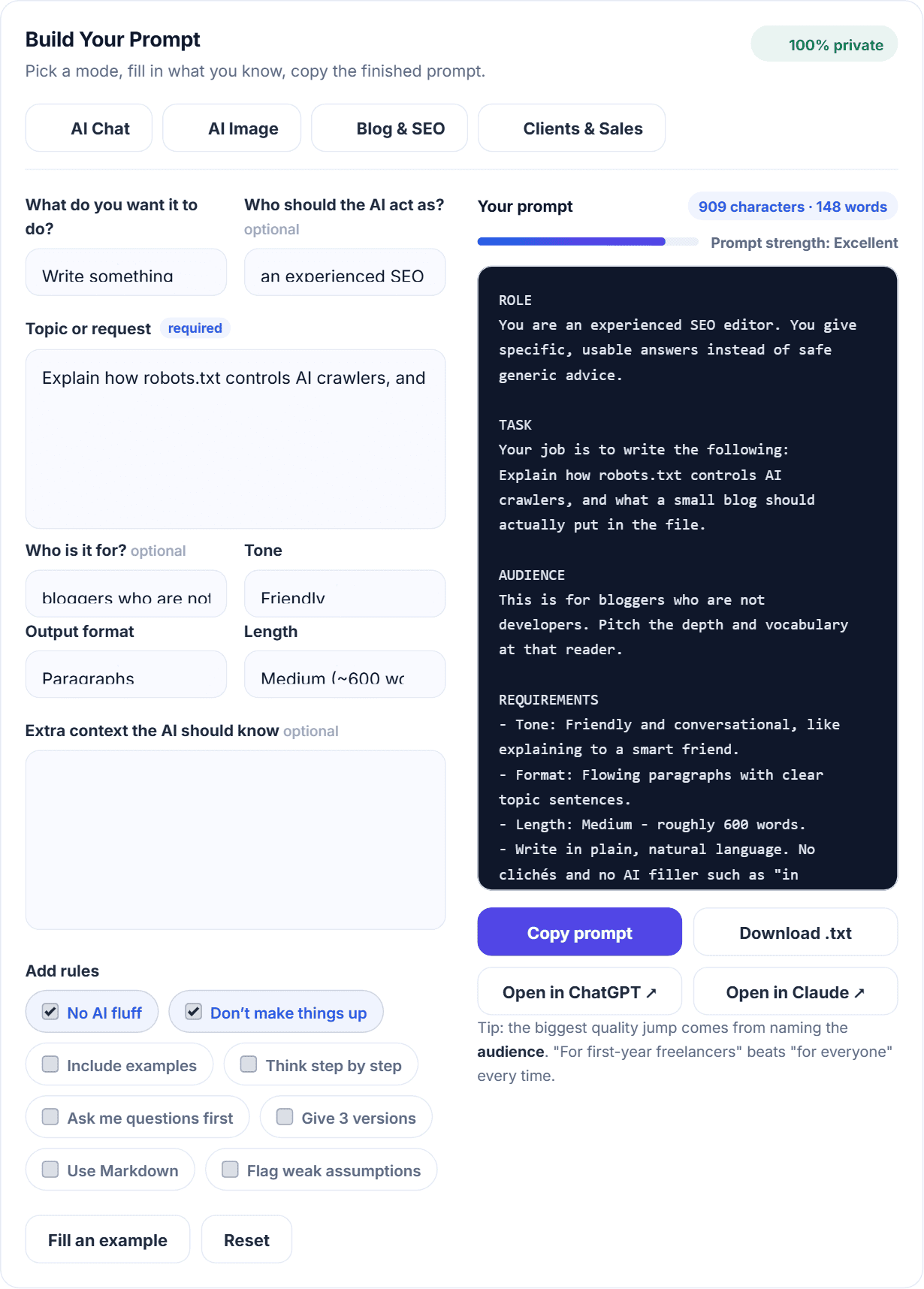
AI Prompt Generator
Build a proper prompt for ChatGPT, Claude, Gemini or Midjourney.
Think of it like giving instructions to a highly skilled new employee. If you say, “write something about marketing,” they’ll produce something generic. If you say, “write a 500-word LinkedIn post for our SaaS product targeting small business owners, using a conversational tone with a surprising statistic in the opening,” — they produce exactly what you need.
Claude is a skilled employee. Your prompt is your instruction. This guide teaches you how to write instructions that get results.
The Anatomy of a Perfect Prompt
Every great prompt contains some combination of these six elements:
1. Role — Tell Claude who to be 2. Task — Tell Claude what to do 3. Context — Give Claude the background it needs 4. Format — Specify how the output should look 5. Tone — Describe the voice and style 6. Constraints — Set limits (word count, what to avoid, etc.)
You don’t need all six in every prompt. But the more relevant elements you include, the better the output.
Element 1: Role — Tell Claude Who to Be
Assigning Claude a role dramatically improves response quality by activating the most relevant knowledge and communication style.
Without role: “Give me advice on my freelance pricing.”
With role: “You are an experienced freelance business coach who has helped hundreds of freelancers increase their rates without losing clients. Give me advice on how to raise my freelance writing rates from $30 to $60 per article without scaring away existing clients.”
The second prompt tells Claude exactly what expertise to draw from — producing advice that’s more specific, more practical, and more aligned with what you actually need.
Useful roles for different tasks:
| Task | Effective Role |
| Blog writing | “You are an experienced SEO content writer with 10 years of experience writing for global audiences” |
| Business advice | “You are a startup advisor who has helped early-stage entrepreneurs build sustainable online businesses” |
| Email writing | “You are a professional copywriter specializing in persuasive business communication” |
| Code review | “You are a senior software engineer who specializes in clean, maintainable code” |
| Career advice | “You are a career coach who specializes in helping professionals transition into remote work” |
Element 2: Task — Be Specific About What You Want
The most common prompting mistake is being too vague about the actual task.
Vague task: “Write about affiliate marketing.”
Specific task: “Write a 1,500-word beginner’s guide to affiliate marketing that explains: what it is, how commissions work, the 3 best programs for beginners, and a step-by-step plan to earn the first $100.”
Even more specific: “Write a 1,500-word beginner’s guide to affiliate marketing. Structure it with: an engaging introduction that addresses the reader’s skepticism, 5 H2 sections covering definition, commission types, program selection, content strategy, and first steps. End with a specific 7-day action plan. Target keyword: ‘affiliate marketing for beginners 2026’.”
Each version gives Claude more to work with — and produces progressively better output.
Task specificity checklist:
- What type of content? (article, email, list, script, code, plan)
- How long? (word count, number of items, pages)
- What specific points must be covered?
- What is the end goal of this content?
Element 3: Context — Give Claude What It Needs to Know
Claude does not know your specific situation unless you provide it. Context transforms generic output into personalized, relevant responses.
Without context: “Write a LinkedIn post about my blog.”
With context: “I run a blog called TheHNSolutions that helps beginners earn money online using AI tools, blogging, and affiliate marketing. My target audience is global — mainly people aged 20-35 who want to build an online income from scratch. I just published my 10th article about AI tools for freelancers. Write a LinkedIn post announcing this milestone that feels genuine and encourages people to check out the blog.”
Types of context to include:
Your situation:
- Who you are and what you do
- What platform or audience is this for
- What you’ve already tried or what you already know
The audience:
- Who will read this?
- What do they already know?
- What do they care about?
- What problem are they trying to solve?
The goal:
- What action should this content inspire?
- What’s the desired outcome?
- What does success look like?
Element 4: Format — Tell Claude How to Structure the Output
Without format instructions, Claude makes its own structural choices — which may not match what you need. Specify format explicitly.
Format examples:
For articles: “Structure with: an introduction, 5 H2 sections each with 2-3 H3 subsections, a FAQ section with 5 questions, and a conclusion with a call to action.”
For lists: “Provide exactly 10 items. For each item, include: a bold title, a 2-sentence explanation, and one practical example.”
For emails: “Format as: subject line, greeting, 3 short paragraphs, bullet point summary, clear call to action, professional sign-off.”
For plans: “Present as a weekly breakdown for 4 weeks. Each week should have: 3 specific daily tasks, one measurable milestone, and one potential obstacle with a solution.”
For comparisons: “Present as a structured comparison table with the following columns: Feature, Option A, Option B, Winner. Follow with a 200-word recommendation.”
Requesting specific output types:
- “Give me bullet points, not paragraphs”
- “Use numbered steps, not prose”
- “Present as a table”
- “Write in conversational paragraphs without any bullet points”
- “Include headers for each section”
- “No headers — write as flowing prose”
Element 5: Tone — Define the Voice
Tone dramatically affects how content lands with its audience. Claude adapts to any tone you specify — but you need to specify it.
Tone descriptors that work well:
| Tone | Best Used For |
| Conversational and friendly | Blog posts, social media, and emails to warm audiences |
| Professional and authoritative | Business proposals, white papers, LinkedIn content |
| Educational and encouraging | Tutorials, how-to guides, beginner content |
| Direct and concise | Executive summaries, instructions, technical docs |
| Warm and empathetic | Support emails, community content, sensitive topics |
| Bold and persuasive | Sales copy, landing pages, pitch decks |
Tone prompt examples:
“Write in a conversational, encouraging tone — like a knowledgeable friend explaining something, not a textbook.”
“Tone: professional but approachable. Avoid jargon. Write as if explaining to a smart non-expert.”
“Match the tone of this sample: [paste sample]. Write with the same personality, sentence rhythm, and vocabulary level.”
The tone matching technique: This is one of Claude’s most powerful capabilities. Paste a sample of existing writing and ask Claude to match it exactly. This is invaluable for:
- Writing in a client’s brand voice
- Maintaining consistency across a blog
- Ghostwriting for someone else’s platform
Element 6: Constraints — Set the Boundaries
Constraints prevent Claude from going in directions you don’t want and focus the output on exactly what you need.
Common useful constraints:
Length: “Under 200 words.” / “Between 1,200 and 1,500 words.” / “Exactly 5 bullet points.”
What to avoid: “Don’t use bullet points — write in prose only.” “Avoid technical jargon — this is for complete beginners.” “Don’t include information about [topic] — the client has asked us to avoid this.” “Don’t start the response with ‘I’ or ‘As an AI’.” “Avoid clichés like ‘in today’s world’ or ‘in conclusion’.”
What to include: “Must include a specific call to action at the end.” “Include the keyword ‘affiliate marketing for beginners’ naturally in the first paragraph.” “The response must reference a specific example or case study.”
Perspective: “Write in first person (I/we).” “Write in second person (you).” “Write in third person.”
Advanced Prompting Techniques
Once you’re comfortable with the six elements, these techniques are where prompts start getting noticeably better:
The Chain of Thought Technique
Ask Claude to think through a problem step by step before giving you the answer. This produces more reasoned, accurate responses for complex questions.
“Before answering, think through this step by step: [your question]. Show your reasoning, then give me your final recommendation.”
The Persona Technique
Set a comprehensive persona at the start of a conversation that persists throughout.
“For this entire conversation, you are my senior content strategist. You have 15 years of experience in SEO and content marketing. You’re direct, opinionated, and results-focused. You don’t hedge unnecessarily — you give clear recommendations. You know my blog is TheHNSolutions, targeting beginners wanting to earn online. Keep this context in mind for everything I ask you.”
The Iterative Refinement Technique
Use Claude’s previous output as the foundation for improvement.
Round 1: “Write a blog introduction about AI tools for freelancers.” Round 2: “Good start. Now make the opening sentence more surprising — something that challenges a common assumption. Keep everything else.” Round 3: “Perfect opening. Now the second paragraph needs to be more specific — add a concrete example or statistic.”
This produces significantly better output than trying to get everything right in one prompt.
The Comparison Technique
Ask Claude to generate multiple versions and explain the difference.
Write 3 different opening paragraphs for this article about AI tools. Each should use a different hook strategy: (1) a surprising statistic, (2) a relatable problem, (3) a provocative question. Label each and briefly explain the strategy used.”
The Self-Review Technique
Ask Claude to critique its own output.
“Now review what you just wrote. What are the three weakest parts? How would you improve each one? Then rewrite the weakest section, incorporating your own suggestions.”
This often surfaces improvements that even a detailed prompt didn’t anticipate.
Before and After: Real Prompt Transformations
Example 1: Blog Introduction
Before (weak prompt): “Write a blog intro about making money online.”
Result: Generic paragraph about how the internet has created many opportunities…
After (strong prompt): “Write a blog introduction for an article titled ‘How to Make Money Online in 2026: The Complete Beginner’s Guide.’ The target audience is people aged 20-35 who are skeptical about online income claims after seeing too many scams. Open with a statement that acknowledges their skepticism, then pivot to why 2026 is genuinely different. Tone: honest, direct, encouraging. Under 150 words. No clichés.”
Result: A specific, compelling introduction that immediately builds trust with a skeptical audience.
Example 2: Client Email
Before: “Write an email to a client about a late payment.”
Result: Awkward, overly formal demand letter.
After: “Write a payment reminder email to a client named Sarah whose invoice for $300 is 10 days overdue. This is a good client I want to keep long-term. Tone: warm and assuming the delay is an oversight, not intentional. Include: the invoice amount, the due date, a simple payment link placeholder, and an offer to discuss if there’s an issue. Under 100 words. No passive-aggressive undertones.”
Result: A professional, relationship-preserving message that gets results.
Example 3: Social Media Caption
Before: “Write an Instagram caption for my blog post.”
Result: Generic caption with generic hashtags.
After: “Write an Instagram caption for a blog post titled ‘How to Use Claude AI for Freelancers: 10 Practical Ways.’ My audience is freelancers aged 22-35 interested in using AI to earn more. Tone: practical and motivating — like a tip from a peer, not a brand. Start with a hook that doesn’t begin with ‘Are you’ or ‘Have you ever.’ Include one specific insight from the article. End with a call to action to read the full guide (link in bio). 5 relevant hashtags. Under 150 characters total caption.”
Result: An engaging, specific caption that drives clicks.
Common Prompting Mistakes and How to Fix Them
Mistake 1: Starting every session without context: Claude has no memory between conversations. Start each new session with a brief context paragraph about who you are, what you’re working on, and what you need. This one habit dramatically improves consistency.
Mistake 2: Accepting the first output without iteration: Claude’s first response is a starting point. The best outputs come from 2-3 rounds of refinement. Never assume the first response is the final response.
Mistake 3: Asking for too much at once: “Write me a complete marketing strategy for my business, including social media, email, content, and paid advertising,” produces shallow output across all areas. Break complex requests into focused subtasks.
Mistake 4: Not specifying the audience: “Write for beginners” and “write for experienced professionals” produce completely different content. Always specify who will read the output.
Mistake 5: Forgetting to specify what NOT to do: Constraints are as important as instructions. Tell Claude what to avoid — clichés, bullet points, jargon, specific topics — and the output improves immediately.
Your Prompt Template Library
Save these templates and customize them for repeated use:
Blog article: “You are an experienced SEO content writer. Write a [word count] article titled ‘[title]’ targeting the keyword ‘[keyword]’. Audience: [describe]. Tone: [describe]. Structure: introduction, [number] H2 sections with H3 subsections where needed, FAQ with [number] questions, conclusion with CTA. Avoid: [list things to avoid].”
Social media post: “Write a [platform] post for [brand/blog name] announcing [topic]. Audience: [describe]. Tone: [describe]. Include: [specific elements]. Avoid: [avoid]. Length: [specify]. Hashtags: [number].”
Client email: “Write a [type] email to [client description]. Context: [situation]. Tone: [describe]. Include: [elements]. Keep it under [word count]. Goal: [desired outcome].”
Proposal: “Write a freelance proposal for [job description]. My service: [describe]. My relevant experience: [describe]. Tone: confident and client-focused. Structure: specific opening about their project, understanding of their need, my approach, one example, closing question. Under 200 words.”
Final Thoughts: Prompting Is a Skill Worth Developing
The ability to write effective prompts is one of the most valuable new skills of 2026. As AI tools become central to professional work, the people who can direct AI effectively produce dramatically better results than those who can’t.
The good news: prompting improves quickly with practice. Use the six elements. Apply the advanced techniques. Build your template library. And iterate — every prompt you refine makes the next one easier to write.
Claude is already one of the most capable AI assistants available. Learning to prompt it effectively is how you unlock that capability fully.
Explore more Claude AI guides on TheHNSolutions:
🔗 How to Use Claude AI – Complete Beginner’s Guide
🔗 Claude AI for Freelancers – 10 Practical Ways
🔗 Best AI Tools for Beginners in 2026
🔗 ChatGPT vs Claude – Which Is Better for Bloggers?
🔗 What Is AI Automation? How Beginners Can Automate Their Work in 2026